
Connect with us
For those who are familiar with BuddyPress, it’s a plugin for WordPressμ only. But Scott has created a plugin that would allow for single user compatibility.
I’ve updated the site to the latest release of WordPress. 2.8.1 fixes many bug found in 2.8 and I finally was ready for the update. While...
Following up on the WordPress weekly, and the final topic of discussion; changelogs and implementing them into your plugins. Now a plugin, shows the changelog in...
Version 0.1.0 of VideoPress now available for you self hosted WordPress blog.
For the longest time I remember checking out my WordPress stats via this Stats plugin and it always cut of my day at 4pm. This was...
If you’ve downloaded the Swekey plugin and plan on using it for users to login here is what you might see. The first image here shows...
I received a Swekey in the mail this week. What’s a Swekey you ask? Like regular keys protect your car and your home against thieves and...



This article provides a comprehensive overview of the top 10 AI writing tools as voted by their peers. The tools include Grammarly, Writesonic, Quillbot, Jasper, OpenAI...
I talked about the Twittar plugin in a previous post. But learned that the read me text file was only useful for installing the necessary php...
Hey everyone, I just wanted to write a little about a new plugin I came across today. It’s called Absolute Privacy. This plugin can easily help...
Yesterday I found and downloaded the WP Greet Box plugin from Omni Noggin. This plugin could be a very useful tool and keeping visitors from various...
There is a really neat plugin named Twitip-ID for WordPress. As you can see, if you have commented on this site I was using this plugin....
Every one is aware of Twitter, I hope. Well there are many, many plugins for your WordPress that you can use. So I am not going...
Many weblog sites these days have some form of an archive page. In WordPress it might be the built in auto generation of permalinks by: /Month/...
Today Matt Mullenweg from MA.TT declared today official plugin developer day because the plugin directory hit 4,000 plugins, check it out: 4,000 Plugins.
I recently went looking for a good audio player for WordPress. I came across WPAudioPlayer from 1 pixel out. The plugin is extremely simple to use...
Firefox is regarded as the best Web browser in terms of extensions. It has hundreds of add-ons, which can be downloaded from here. Pavel Ciorici collected...


When you have a real estate blog, sometimes it can be difficult to come up with enough topics to write...
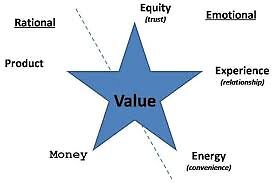

When it comes to your business, marketing is extremely important. With the popularity of social media, gaining marketing tips can...


Maybe you have the new software on your Apple device that has made headlines as not being reliable, or perhaps...


Knowing Where To Start There are a number of conceptual business models that are used throughout the professional world in...


Google recently announced it has launched its Disavow Tool which allows webmasters to alert Google of any backlinks they think...


Depending on your needs, WordPress plugins are the best and worst aspects of WordPress. The whole purpose of plugins should...


Classic CTR Themes For WordPress have made it pretty easy to build informational websites using Adsense that can get you...


In today’s techno-centric culture, you simply must have a business website, no matter how small or “local” your restaurant business...


Photography is the art of capturing naturalistic images with the help of photographic cameras. It is the science of framing...


Have you opened up a new website or a business and want to drive more traffic towards it? Check out...