
Connect with us
Last week I wrote how to “Use WordPress to print a RSS feed for Eventbrite attendees“. It was pretty popular, but then I found myself in...
Today I was working on the WordCamp.LA site. I was trying to show the “attendee list” on the attendees page with out having to update the...
I’ve updated the site to the latest release of WordPress. 2.8.1 fixes many bug found in 2.8 and I finally was ready for the update. While...
Looking to add a favicon to you site? Inside your WordPress theme’s functions file (functions.php) add the following to inside your PHP code. /** * FAVICON...
Today let’s learn a simple quick trick on how to create a custom widget. For my example I will show you how I created my Showcase...


When you have a real estate blog, sometimes it can be difficult to come up with enough topics to write...
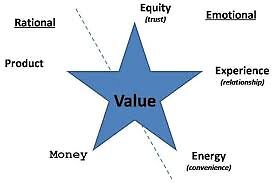

When it comes to your business, marketing is extremely important. With the popularity of social media, gaining marketing tips can...


Maybe you have the new software on your Apple device that has made headlines as not being reliable, or perhaps...


Knowing Where To Start There are a number of conceptual business models that are used throughout the professional world in...


Google recently announced it has launched its Disavow Tool which allows webmasters to alert Google of any backlinks they think...

Depending on your needs, WordPress plugins are the best and worst aspects of WordPress. The whole purpose of plugins should...


Classic CTR Themes For WordPress have made it pretty easy to build informational websites using Adsense that can get you...

In today’s techno-centric culture, you simply must have a business website, no matter how small or “local” your restaurant business...


Photography is the art of capturing naturalistic images with the help of photographic cameras. It is the science of framing...


Have you opened up a new website or a business and want to drive more traffic towards it? Check out...